Migration from 19.x.x to 20.0.0
IMA.js 20 is a significant release that brings major improvements to performance, developer experience, and modern JavaScript standards. This release focuses on modernizing the framework, improving server-side capabilities, and providing better tools for building high-performance applications.
This is a major release with several breaking changes. While most applications can migrate with minimal changes, some features have been removed or redesigned for security and performance reasons. Please read through the breaking changes carefully before upgrading.
What's New in IMA.js 20? 🎉
Modern JavaScript Standards (ES2024)
IMA.js 20 now targets ES2024 (previously ES2022), bringing support for the latest JavaScript features and improvements. This includes:
- Native
Promise.withResolvers()support Object.groupBy()for efficient data grouping- Latest ECMAScript features for better performance
Asynchronous Application Bootstrap
The entire application bootstrap process has been refactored to be fully asynchronous, enabling:
- Better performance metrics
- More reliable server startup
JSON Controllers & Server-Only Code
A powerful new feature for building API endpoints within your IMA application:
- Direct JSON responses from controllers using
$responseType = 'json' 'use server'directive to mark server-only code- Automatic stripping of server code from client bundles
- Reduced bundle sizes and improved security
'use server';

export default class ApiController extends AbstractController {
  static $responseType = 'json';

  async load() {
    return { data: 'JSON response!' };
  }
}
Learn more about JSON Controllers →
Advanced Performance Tracking
New TimingTracker system for monitoring and optimizing server-side performance:
- Automatic tracking of all IMA server events
- Visual timeline of request processing
- Slow operation detection
- APM integration (Datadog, New Relic, etc.)
- Zero overhead when disabled
instrumentEmitterWithTimings(emitter, {
  enabled: true,
  logToConsole: true,
  slowThreshold: 50,
});
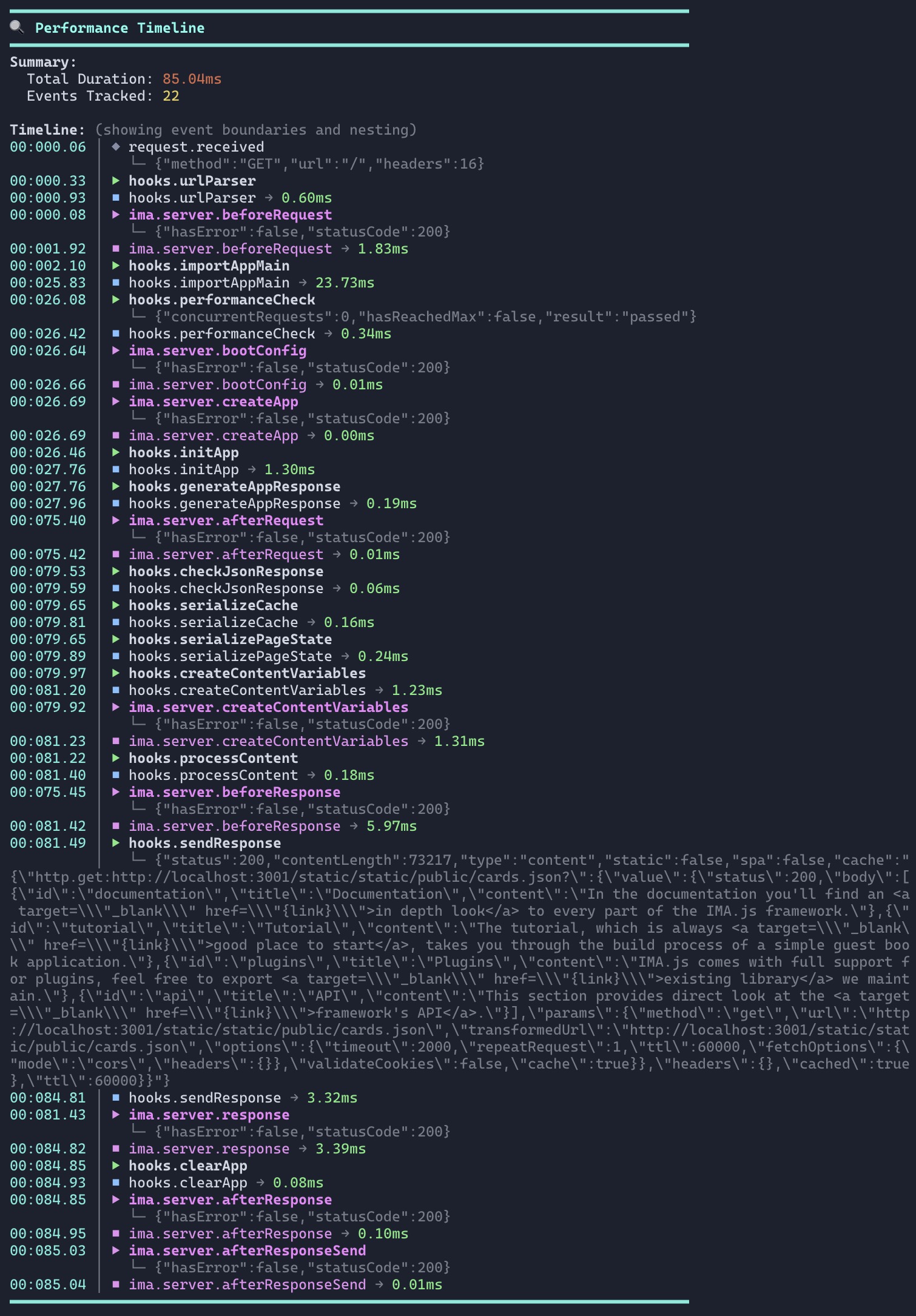
Learn more about Timing Tracking →
SPA Prefetch Mode
New rendering mode that enables fast client-side navigation while maintaining SSR benefits:
- Server sends minimal HTML shell
- Client boots using data from cache sent from server along with the HTML
- Combines SSR reliability with SPA speed
- Configurable per-request using degradation functions
Enhanced Security
- Removed
$IMA.$Path(security risk - exposed application file paths) - Better XSS protection in revival settings
- Improved sanitization of server data
Simplified Configuration
Most default settings moved from template to core (PR #621), meaning:
- Less boilerplate in new projects (~100 lines of config removed from templates)
- Sensible defaults out-of-the-box for
$Http,$Cache,$Router, and$Server - Easier upgrades for existing applications
- More consistent behavior across projects
Settings that now have defaults:
- HTTP Agent: timeout, retries, cache, CORS, headers
- Cache: TTL, enabled state
- Router: middleware timeout
- Server: port, concurrency, static path, logger, cache settings
updated dependencies
- Updated all project dependencies
- Updated to chokidar v4 for better file watching
- Improved source map support
- Better TypeScript support throughout
- Module resolution updates (
Node16→nodenext)
Migration Guide
1. Update Dependencies
Update all IMA.js packages to version 20.x.x:
npm install @ima/core@20 @ima/server@20 @ima/cli@20 @ima/react-page-renderer@20 @ima/testing-library@20 @ima/helpers@20
If using additional packages:
npm install @ima/plugin-cli@20

npm install @ima/storybook-integration@20
2. Update Node.js & Build Tools
Ensure you're using compatible versions:
- Node.js: 22.x or higher
- npm: 9.x or higher
3. Update Target Environment (ES2024)
Update tsconfig.json:
{
  "compilerOptions": {
    "target": "ES2024",
    "lib": ["ES2024", "DOM", "DOM.Iterable"],
    "module": "Node16",
    "moduleResolution": "nodenext"
  }
}
Update .eslintrc.js:
module.exports = {
  env: {
    browser: true,
    node: true,
    es2024: true, // Changed from es2022
  },
  // ... rest of config
};
Update jest.config.js (if using SWC):
module.exports = {
  transform: {
    '^.+\\.(t|j)sx?$': [
      '@swc/jest',
      {
        jsc: {
          target: 'es2024', // Changed from es2022
          // ... rest of config
        },
      },
    ],
  },
};
4. Async Bootstrap Changes ⚠️ BREAKING
The application bootstrap is now fully asynchronous.
Update client entry points
// Before
reviveClientApp();

// After
await reviveClientApp();
Update your onLoad handler to await the reviveClientApp function in main.js:
ima.onLoad().then(async () => {
  await ima.reviveClientApp(getInitialAppConfigFunctions());
});
5. Add Required Server Template: overloaded.ejs ⚠️ BREAKING
IMA.js 20 introduces a new server degradation system that requires an additional server template file for handling overload scenarios.
Create the overloaded.ejs template
Create a new file at server/template/overloaded.ejs in your application root:
<!DOCTYPE html>
<html lang="en">
  <head>
    <meta charset="utf-8">
    <meta name="viewport" content="width=device-width, initial-scale=1">
    <meta name="robots" content="noindex, nofollow">
    <title>Service Temporarily Unavailable</title>
  </head>
  <body>
    <h1>Service Temporarily Unavailable</h1>
  </body>
</html>
This template is automatically used when the server degradation system detects an overload condition based on your isOverloaded degradation function.
Custom template path (optional)
If you want to use a custom path for your overloaded template, configure it in your environment settings:
// server/config/environment.js
module.exports = {
  prod: {
    $Server: {
      template: {
        overloaded: './custom/path/to/overloaded.ejs',
        // You can also customize other templates
        spa: './custom/path/to/spa.ejs',
        '500': './custom/path/to/500.ejs',
        '400': './custom/path/to/400.ejs',
      },
    },
  },
};
Understanding the degradation flow
The degradation system works in the following order (from most to least severe):
- Overloaded (503): Returns the
overloaded.ejstemplate immediately - Static Error Pages: Serves pre-rendered static HTML for error routes
- SPA Mode: Sends minimal HTML shell, client renders everything
- SPA Prefetch: Server-side renders but optimized for client hydration
- Full SSR: Normal server-side rendering (default)
Required template files summary
Ensure your server/template/ directory contains all required template files:
your-app/
├── server/
│   └── template/
│       ├── spa.ejs          ← SPA shell template
│       ├── 500.ejs          ← Server error template
│       ├── 400.ejs          ← Client error template
│       └── overloaded.ejs   ← Overloaded template (NEW in v20!)
└── app/
    └── config/
Learn more about Performance & Degradation →
6. Remove $IMA.$Path ⚠️ BREAKING
The $IMA.$Path global has been removed without replacement due to security concerns (exposed application file paths to the client).
Remove from settings files:
// app/config/settings.js
export default {
  prod: {
    // Remove this line
    // $Path: '/path/to/app',
  },
};
Remove from DocumentView/spa.ejs:
// Remove any references like:
$IMA.$Path = "...";
If your application relied on $IMA.$Path, you'll need to find alternative approaches. In most cases, this value wasn't actually needed in client code.
7. Update Environment Configuration ⚠️ BREAKING
IMA.js 20 includes significant changes to default configuration. Many settings that were in your template are now in core with sensible defaults.
Review and simplify server/config/environment.js:
The following settings now have defaults in core and can be removed from your environment.js file:
Environment defaults (you can remove these):
module.exports = {
  prod: {
    // ✂️ These can be removed - now have defaults in core:
    $Debug: false,                    // Default: false (prod), true (dev)
    $Language: { '//*:*': 'en' },     // Default: { '//*:*': 'en' }
    $Server: {
      port: 3001,                     // Default: 3001
      staticPath: '/static',          // Default: '/static'
      concurrency: 5,               // Default: 5 (prod), 1 (dev)
      clusters: null,                 // Default: null
      cache: {
        enabled: false,               // Default: false
        cacheKeyGenerator: null,      // Default: null
        entryTtl: 3600000,           // Default: 3600000 (1 hour)
        unusedEntryTtl: 900000,      // Default: 900000 (15 minutes)
        maxEntries: 500,             // Default: 500
      },
      logger: {
        formatting: 'simple',         // Default: 'simple' (prod), 'dev' (dev)
      },
    },
  },
};
After cleanup - minimal configuration:
const pkgJson = require('../../package.json');

module.exports = {
  prod: {
    $Version: pkgJson.version,
    // Only include settings specific to your application
    // All the defaults above are now provided by core
  },
};
Only keep settings in environment.js that you need to override from the defaults or that are specific to your application (like $Proxy configuration).
Review and simplify app/config/settings.js:
Similarly, many settings defaults were moved to core:
Settings defaults (you can remove these):
export const initSettings = (ns, oc, config) => {
  return {
    prod: {
      // ✂️ These can be removed - now have defaults in core:
      $Http: {
        defaultRequestOptions: {
          timeout: 15000,                 // Default: 15000 ms
          repeatRequest: 1,               // Default: 1
          ttl: 60000,                     // Default: 60000 ms
          fetchOptions: {
            mode: 'cors',                 // Default: 'cors'
            headers: {
              Accept: 'application/json', // Default: 'application/json'
            },
          },
          validateCookies: false,         // Default: false
          cache: true,                    // Default: true
        },
        cacheOptions: {
          prefix: 'http.',                // Default: 'http.'
        },
      },
      $Router: {
        middlewareTimeout: 30000,         // Default: 30000 ms (30 seconds)
      },
      $Cache: {
        enabled: true,                    // Default: true
        ttl: 60000,                       // Default: 60000 ms (60 seconds)
      },
    },
  };
};
After cleanup - minimal configuration:
import { DocumentView } from 'app/document/DocumentView';

export const initSettings = (ns, oc, config) => {
  return {
    prod: {
      $Version: config.$Version,
      $Page: {
        $Render: {
          documentView: DocumentView,  // Required: your DocumentView component
          masterElementId: 'page',     // Required: root element ID
        },
      },
      // Only override defaults when needed, e.g.:
      // $Http: {
      //   defaultRequestOptions: {
      //     timeout: 30000,  // Custom timeout
      //   },
      // },
    },

    dev: {
      // Development-specific overrides only
    },
  };
};
The $Page.$Render settings are still required as they're specific to your application (your DocumentView and root element).
8. Update Degradation Configuration ⚠️ BREAKING
The server degradation system has been completely refactored with more flexible function-based approach.
Old configuration (removed):
// ❌ These no longer work
module.exports = {
  prod: {
    $Server: {
      staticConcurrency: 100,
      overloadConcurrency: 100,
      serveSPA: {
        allow: true,
        blackList: userAgent => /Googlebot|SeznamBot/.test(userAgent),
      },
    },
  },
};
New configuration:
const { createUserAgentDegradation, invert } = require('@ima/server/degradation');

module.exports = {
  prod: {
    $Server: {
      degradation: {
        // Replace serveSPA with isSPA function
        isSPA: invert(
          createUserAgentDegradation(/Googlebot|SeznamBot/i)
        ),

        // Custom static page logic
        isStatic: (event) => {
          // Return true to serve static HTML
          return false;
        },

        // Custom overload logic
        isOverloaded: (event) => {
          // Return true to show overload page
          return false;
        },

        // NEW: SPA Prefetch mode
        isSPAPrefetch: (event) => {
          // Return true to use SPA prefetch mode
          return false;
        },
      },
    },
  },
};
Migration examples:
// Old: Allow SPA for all except bots
serveSPA: {
  allow: true,
  blackList: userAgent => /Googlebot/.test(userAgent),
}

// New: Same behavior
degradation: {
  isSPA: invert(createUserAgentDegradation(/Googlebot/i)),
}
// Old: Serve static pages at high concurrency
staticConcurrency: 100,

// New: Custom function with access to full context
degradation: {
  isStatic: (event) => {
    const concurrent = event.context.server.instanceRecycler.getConcurrentRequests();
    return concurrent > 100;
  },
}
Learn more about Performance & Degradation →
9. Update @ima/plugin-cli Watch Paths ⚠️ BREAKING
Chokidar v4 no longer supports globs in watch paths.
Update ima-plugin.config.js:
// Before - using globs
module.exports = {
  additionalWatchPaths: [
    './transform/**/*',
    './polyfill/**/*',
    './setupJest.js',
  ],
};

// After - directories and files only
module.exports = {
  additionalWatchPaths: [
    './transform',      // Directory - all contents watched automatically
    './polyfill',       // Directory - all contents watched automatically
    './setupJest.js',   // File - direct path
  ],
};
When you specify a directory, all its contents are watched recursively. You don't need glob patterns anymore.
Optional: New Features to Adopt
JSON Controllers with 'use server'
Create API endpoints within your IMA application:
1. Create a JSON controller:
// app/page/api/articles/ArticlesApiController.js
'use server';

import { AbstractController } from '@ima/core';

export default class ArticlesApiController extends AbstractController {
  static $responseType = 'json';

  async load() {
    const articles = await this.#articlesService.fetchAll();

    return {
      data: articles,
      timestamp: Date.now(),
    };
  }
}
2. Add route:
// app/config/routes.js
router.add('api.articles', '/api/articles', ArticlesApiController, () => null);
3. Access the endpoint:
GET /api/articles
→ Returns: { "data": [...], "timestamp": 1234567890 }
Performance Timing Tracking
Add performance monitoring to your server:
// server/app.js
import { instrumentEmitterWithTimings, createIMAServer } from '@ima/server';

const imaServer = createIMAServer();
const { emitter } = imaServer;

instrumentEmitterWithTimings(emitter, {
  enabled: true,
  logToConsole: process.env.NODE_ENV !== 'production',
  slowThreshold: 50,
  samplingRate: process.env.NODE_ENV === 'production' ? 0.1 : 1.0,
  onComplete: (report) => {
    // Send to your APM service
    apm.recordTiming('request.duration', report.totalDuration);
  },
});
Then track custom operations:
emitter.on(Event.Request, async (event) => {
  const { timing } = event.context;

  timing.start('database.query', { table: 'articles' });
  const articles = await db.query('SELECT * FROM articles');
  timing.end('database.query', { rows: articles.length });
});
SPA Prefetch Mode
Hybrid between SSR and SPA:
// server/config/environment.js
const { createUserAgentDegradation, invert } = require('@ima/server/degradation');

module.exports = {
  prod: {
    $Server: {
      degradation: {
        // Enable SPA prefetch for non-bot traffic
        isSPAPrefetch: invert(
          createUserAgentDegradation(/bot|crawler|spider/i)
        ),
      },
    },
  },
};
Full List of Breaking Changes
Global
- Updated dependencies: Updated all project dependencies to the latest versions. This shouldn't affect most applications.
@ima/core
- Async Bootstrap:
bootstrap.run()now returns aPromise. Client functionsbootClientApp()andreviveClientApp()are nowasync. - Removed
$IMA.$Path: Security risk - no replacement provided. - ES2024 Target: Build now targets ES2024 instead of ES2022.
- Environment Types:
Environmenttype updated, useParsedEnvironmentfor parsed config. - Default Settings: Many settings (like
$Http,$Cache,$Routertimeouts, defaults, etc.) now have core defaults. While technically breaking if you relied on having NO defaults, most apps will benefit from this change. See Update Environment Configuration for details.
@ima/server
- Required Template File: New
overloaded.ejstemplate file is required inserver/template/directory for handling server overload scenarios (503 errors). - SPA Config: SPA configuration was completely removed and replaced with degradation functions (see Update Degradation Configuration for more information).
- Degradation Config: Complete rewrite - see Update Degradation Configuration.
@ima/react-page-renderer
- Removed
$IMA.$Path: Update any DocumentView code that referenced this.
@ima/cli
- ES2024 Target: All builds now target ES2024.
@ima/plugin-cli
- Chokidar v4: Globs no longer supported in
additionalWatchPaths- see Update Watch Paths. - ES2024 Target: Plugin builds now target ES2024.
- Updated to chokidar v4.0: Breaking change in watch paths.
create-ima-app
- ES2024 Target: New projects use ES2024.
- Simplified Config: Most defaults moved to core. New projects have much cleaner
environment.jsandsettings.jsfiles. Existing projects can safely remove default configuration values - see Update Environment Configuration.
Full List of New Features & Improvements
@ima/core
- JSON Controllers: New
$responseType = 'json'for controllers. - Async Bootstrap: For better performance metrics.
- ControllerResponseType: New TypeScript type export.
- Cache Performance: Minor serialization/deserialization improvements.
- ParsedEnvironment: New type for environment configuration.
@ima/server
- TimingTracker: Advanced performance monitoring system.
- instrumentEmitterWithTimings: Automatic performance tracking integration.
- SPA Prefetch Mode: New rendering mode (hybrid between SSR and SPA) for optimal performance.
- Degradation Functions: Flexible, function-based degradation system.
- Degradation Helpers:
createUserAgentDegradation(),invert()utilities. - Performance Metrics: Detailed timing data in console and APM integration.
@ima/cli
- 'use server' Directive: Strips server-only code from client bundles.
- UseServerProcessor: Babel transformer for server-only code.
- ES2024 Support: Latest JavaScript features in build output.
- --forceSPAPrefetch: CLI flag for testing SPA prefetch mode.
@ima/react-page-renderer
- SPA Prefetch Support: Renderer skips HTML generation in prefetch mode.
@ima/testing-library
- Updated for v20: Full support for async bootstrap and new features.
create-ima-app
- Simplified Templates: ~100 lines of boilerplate configuration removed from templates thanks to core defaults (PR #621).
- Cleaner Config Files:
environment.jsandsettings.jsare now minimal and focused on app-specific configuration. - ES2024 Templates: New projects use latest JavaScript.
- Updated Dependencies: Latest versions of all peer dependencies.